
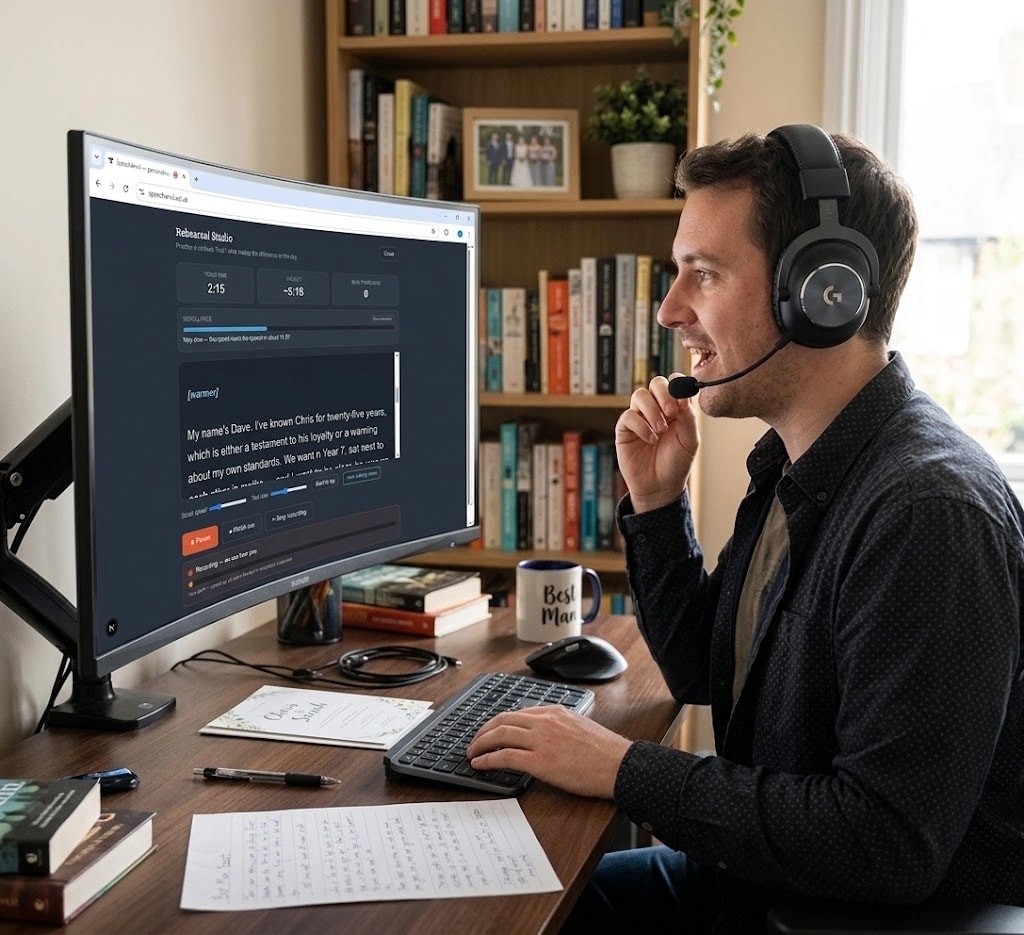
The part everybody skips
A speech is not finished when the writing is finished
Most speech advice stops at the last full stop. That is a strange place to stop, because almost nothing goes wrong on the page. It goes wrong in the three minutes when somebody is standing up, holding a shaking piece of paper, speaking considerably faster than they intended.
Nerves do something specific and predictable: they speed you up. A speech that reads comfortably in your head at four minutes can arrive at two minutes and forty seconds on the day, with every pause swallowed and every punchline delivered before the room has caught up.
The only reliable cure is practising out loud, at the pace you will actually speak, more than once. The Rehearsal Studio exists to make that easy enough that people actually do it.
How it works
From finished speech to confident delivery
The studio opens from the same page as your completed speech. There is no separate app, no file to transfer and no account to create.
- 01
Open the studio from your finished speech
Once your speech has been written, a button on the same page opens the Rehearsal Studio. Nothing to install, nothing to transfer.
- 02
Set a scroll speed that suits you
Adjust the speed and text size until the words arrive at a pace you can speak comfortably. The studio tells you roughly how long the whole speech will take at that setting.
- 03
Start a run-through and speak it aloud
The text scrolls, the timer starts and the pace bar responds live. Speaking out loud is the part most people skip, and it is the part that makes the difference.
- 04
Record yourself if you want to hear it back
A level meter shows the microphone is picking you up. Play the recording back and you will hear the rushing, the swallowed punchlines and the sentences that need simplifying.
- 05
Check your real timing at the end
When you finish, the studio compares your actual time with the target and tells you how much your pauses added. That gap is usually the room laughing.
- 06
Run it again
A counter tracks your run-throughs. Three is usually the difference between reading a speech and giving one.
The teleprompter
Practise looking up, not down
The speech appears in large type on a dark background and scrolls at a speed you set. Both the scroll speed and the text size are adjustable, so you can find a setting that lets you glance down and pick your place up instantly.
That matters more than it sounds. Reading a speech from a sheet of paper tends to fix your eyes downward for whole paragraphs at a time. A teleprompter trains you to look up at the room, which is most of the difference between reading a speech and giving one.
You can pause the scroll at any point, jump back to the top, and run the whole thing again as often as you like.
Pace and timing
Find out how long your speech really takes
Most people badly misjudge how long their speech will run, usually because they time it by reading silently. Silent reading is roughly twice as fast as speaking to a room.
The studio approaches this from two directions. Before you start, it shows the length your speech will take at your current scroll speed, with a colour bar that shifts smoothly from green through amber to red as the pace becomes too quick to follow, along with a plain label such as “Good pace” or “Too fast to follow”. If you prefer a number, a words-per-minute readout can be switched on.
Then, when you finish a run-through, it compares your real time with that target: “You took 4:12 — the scroll was set for 3:40. Your pauses added about 32 seconds.” That gap is not a mistake. It is the room laughing, and it is exactly the information you need when somebody has asked you to keep it under five minutes.
Hearing yourself
Record a run-through and play it back
Recording yourself is uncomfortable and unusually effective. You will hear things you cannot notice while speaking: the sentence you always stumble over, the joke you rush past, the point where your voice drops and the back of the room would lose you.
A live level meter shows the microphone is genuinely picking you up, rather than a recording indicator that blinks reassuringly while capturing silence. When you have finished, you can play the run back straight away, or save it as an ordinary audio file that opens on any computer or phone.
What to listen for
- Sentences you stumble over more than once — usually they are too long.
- Whether your punchlines have room to land, or arrive too quickly.
- Where your energy drops, often two-thirds of the way through.
- Names you rush, particularly ones you are nervous about getting right.
- Whether the sincere section sounds sincere or hurried.
What tends to go wrong
- Practising silently and assuming the timing will hold on the day.
- Reading it once the night before and calling that rehearsal.
- Memorising it word for word, which makes recovery harder if you lose your place.
- Practising sitting down when you will be standing up.
- Skipping the pauses because they feel awkward alone in a room.
Best Speech extra
Delivery cues written into the script
With the Best Speech package, your script can be marked up with short delivery cues placed at the moments that decide whether a line lands — a pause here, a breath there, a beat after the punchline, a glance towards the couple.
The cues appear in the teleprompter in a distinct colour, kept visually separate from the words you actually say, and can be hidden with a single click when you would rather practise with a clean script. They are never counted in the pace calculation, because you do not speak them aloud.
Best Speech also includes written delivery notes covering the three things that matter most in your particular speech, how to handle the turn from funny to sincere, and what to do if something goes wrong.
Privacy
Your recordings never leave your device
Nothing you record is uploaded to SpeechAnvil. The audio is held in your browser for the length of your session and discarded when you close the studio, unless you choose to save a copy to your own device.
We do not store, listen to, analyse or transcribe practice recordings. There is no account to create in order to use the studio, and no recording history kept anywhere.
Getting started
How to reach the Rehearsal Studio
The studio unlocks once your speech is written, and is included with both the Standard and Best Speech packages. Start by answering the guided interview — you will see a personalised plan and one fully written sample moment before deciding whether to buy anything.
Once you have your finished speech, the Rehearsal Studio is one button away on the same page, and you can return to it as often as you like using your private link.
Choose your occasion